





Take Absolute
Control of Updates
Stop unwanted Windows updates, prevent forced reboots, and protect your bandwidth. The ultimate portable utility for stability and peace of mind.

What is Windows Update Blocker?
Windows Update Blocker is a powerful, portable utility designed to give you complete control over your operating system's update behavior. Unlike the standard Windows settings which can be confusing or ignored by the system, WUB offers a one-click solution to instantly disable or enable automatic updates.
Built with stability and performance in mind, it allows you to prevent unexpected reboots, save bandwidth, and protect your custom settings from being overwritten by Microsoft's forced updates.
Key Features
Discover the powerful capabilities that make Windows Update Blocker the ultimate utility for system stability. It provides enterprise-grade control over update services, preventing unexpected reboots and preserving your custom settings.
One-Click Control
Instantly enable or disable Windows Updates with a single toggle. No complex registry hacks or navigating through deep system menus required.
Learn moreService Protection
Prevents Windows from silently re-enabling update services. WUB actively monitors and protects your service configuration settings.
Learn morePortable & Lightweight
No installation required. Run it directly from a USB stick. WUB leaves no trace on your system and supports command-line automation.
Learn moreControl in 3 Simple Steps
No installation needed. Just download and take control.
Download & Run
Extract the files to your desired folder. Since it's portable, simply run the executable—no installation required.
Select Your Status
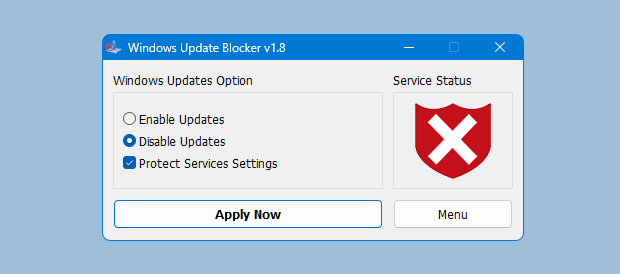
Choose "Disable Updates" to stop unwanted changes, or "Enable Updates" when you're ready to patch.
Click "Apply Now"
Hit the button to instantly enforce your policy. The Service Status icon will change color to confirm protection.
Block Any Other Service
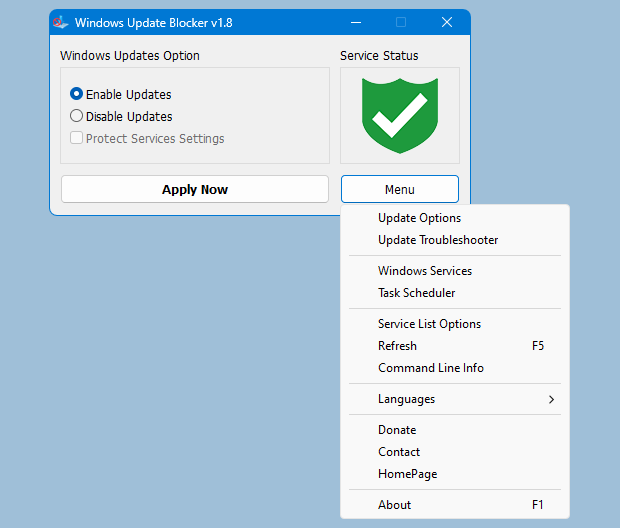
Windows Update Blocker allows you to extend its protection to ANY Windows service.
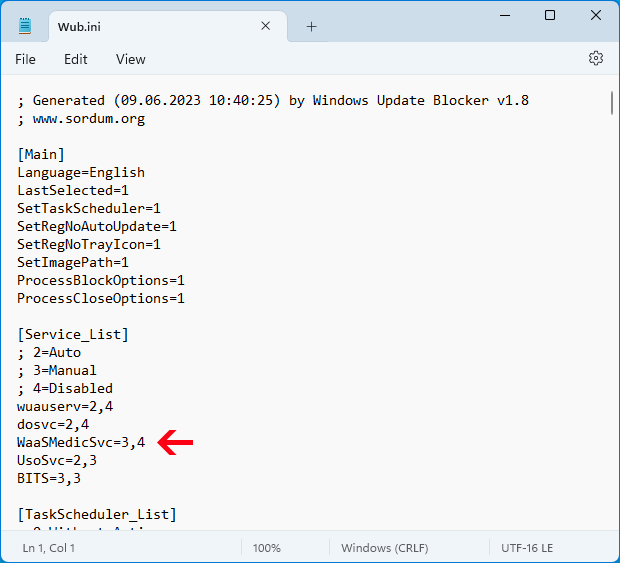
Simply edit the Wub.ini file to add your custom rules.
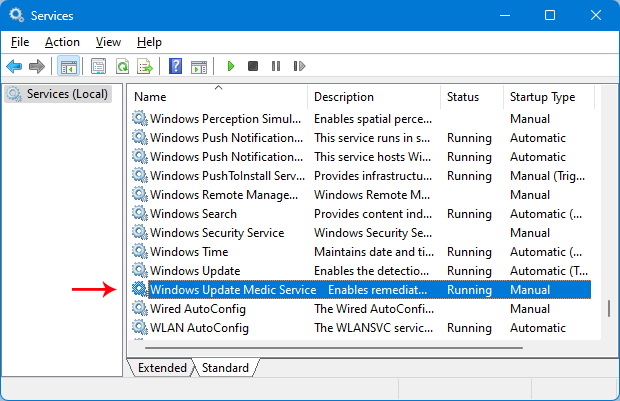
1. Find the Service
Open the Windows Services manager and locate the specific service you want to block.
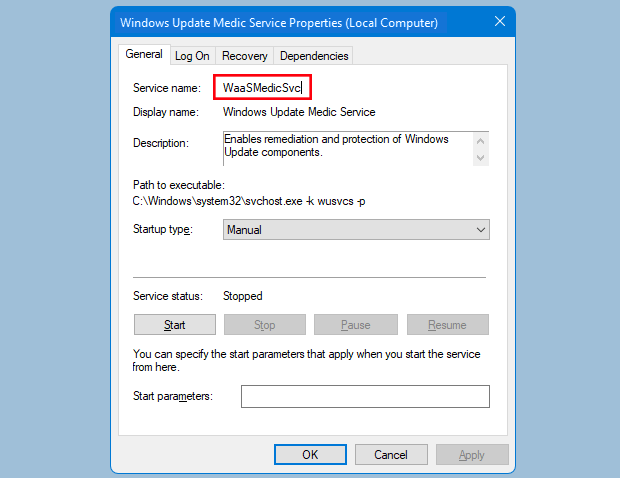
2. Copy Service Name
Open Properties. Highlight and copy the exact Service Name (not the Display Name).
3. Edit Wub.ini
Paste the name under the dosvc=2,4 line in the configuration file.
Example Syntax
Add your service name directly below the default list. Example for 'MapsBroker':
dosvc=2,4
MapsBroker=2,4 <-- Your New Service
WaaSMedicSvc=3,4
Professional Management Tools
Advanced features designed for system administrators and power users who need precision and automation.
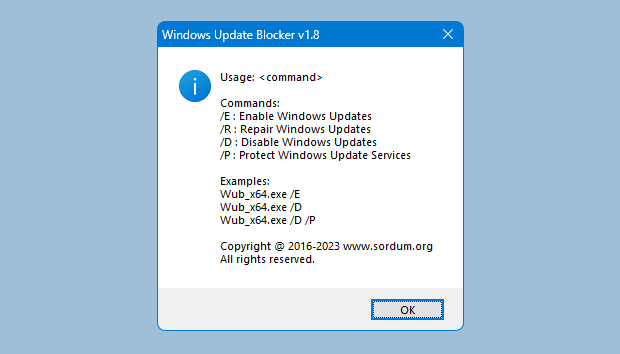
Granular Service Control
Manage up to 25 custom services effortlessly. The built-in Service List Editor lets you toggle protection and startup types for specific services without manually editing files.
- Manage up to 25 services
- Toggle "Protect Settings" per service
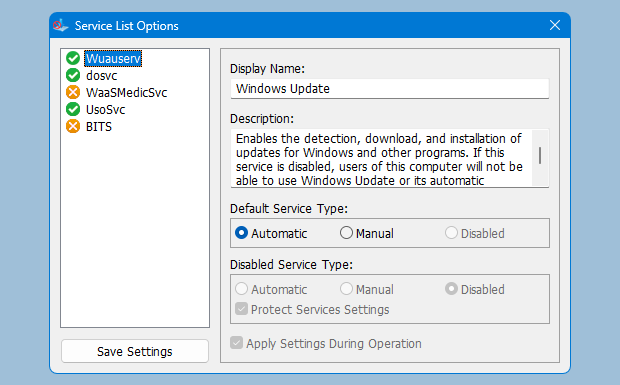
Command Line Automation
Perfect for IT professionals. Automate WUB tasks using simple flags like "/E" (Enable), "/D" (Disable), or "/P" (Protect) in your batch scripts or deployment tools.
Why Choose Windows Update Blocker?
Superior to Windows Settings
While Windows offers options to "pause" updates, they are often temporary and can be overridden by the system without warning. Windows Update Blocker provides a permanent, forceful solution that ensures the update service stays disabled until you decide otherwise. It handles the complex registry and service dependencies that manual methods often miss.
Essential for System Stability
Nothing is worse than an unexpected reboot in the middle of a render, a gaming session, or an important presentation. WUB acts as a safety lock for your system, guaranteeing that your PC behaves exactly as you expect. It is the preferred tool for gamers, streamers, and professionals who demand 100% uptime without interruptions.
Bandwidth & Privacy Control
Windows 10 and 11 can silently consume gigabytes of data in the background, crippling your internet speed or exhausting metered connections. By taking control of the update service, you decide when your bandwidth is used, ensuring your connection remains fast and your data cap remains safe.
Developer & IT Professional Tools
For system admins managing multiple machines, WUB offers robust command-line support for automation scripts. Its portable nature means you can carry it on a USB drive and deploy it instantly on any client machine without installation. The Wub.ini file allows for easy configuration replication across an entire network.
Who Uses Windows Update Blocker?
Everyday Users & Gamers
Prevent unexpected forced reboots during important work, gaming sessions, or streaming. Keep your PC stable and predictable without sudden interruptions.
- Stop mid-game restarts
- Avoid buggy update rollouts
- Save bandwidth on metered connections
System Administrators
IT professionals need consistent environments. WUB allows admins to prevent unauthorized OS changes and maintain standardized configurations across many machines.
- Maintain environment stability
- Deploy via command-line scripts
- Prevent unauthorized changes
Power Users & Enthusiasts
Take absolute control over your OS behavior. Ideal for benchmarking, running legacy software, or ensuring background processes don't interfere with performance.
- Full control over background services
- Run legacy software without issues
- Maximize benchmark performance
Why WUB is the Superior Choice
See how Windows Update Blocker compares to standard system settings.
Windows Update Blocker
- Permanent Disable (Stays off until you say so)
- Protects Service Settings
- One-Click Instant Toggle
- Portable & Command Line Ready
Windows Settings / Services.msc
- Temporary "Pause" only (7 days max)
- Reverts automatically after reboot
- Hard to find deep in menus
- Complex Registry edits required
The Complete Solution for Update Management
WUB represents the evolution of system control tools. While Windows settings offer temporary pauses, WUB provides the depth and permanence required by power users, developers, and system administrators.
Trusted by Users Worldwide
See what the community is saying about Windows Update Blocker.
"Finally, no more mid-game restarts! WUB is essential software for anyone who needs their PC to stay stable uninterrupted. The one-click feature is a lifesaver during tournaments."
Alex R.
Competitive Gamer"Deploying this via command-line across our office network was incredibly easy. It stops Windows 11 from reverting our custom configurations after reboots. Highly reliable tool."
Sarah Chen
System Administrator"I run long overnight renders, and waking up to a rebooted PC was a nightmare. WUB fixed that instantly. It's lightweight, portable, and does exactly what it claims."
Mark D.
Software EngineerUncompromising Trust & Transparency
We believe system tools should be transparent and respectful. Windows Update Blocker is Portable Freeware — meaning no installation, no ads, and absolutely no hidden background processes. What you see is what you get.
No hidden costs, no premium subscriptions, and no trial periods.
Clean code. Scanned by 60+ antivirus engines with a perfect clean score.
Runs directly from EXE. Leaves no registry trash or leftover files.
Key Features
A quick preview of what makes WUB the safest way to stop automatic Windows updates.
One-Click Enable/Disable
Instantly toggle Windows Update services without diving into complex system settings.
Protect Service Settings
Keep your chosen state intact by blocking automatic reactivation of update services.
Command Line Control
Automate update control with simple parameters for scripts and deployment tools.
Why Risk Manual Edits?
Compare Windows Update Blocker against risky manual methods.
Registry Editing
High RiskWUB Utility
Services.msc
TediousWindows Update Control Guides
Explore our detailed guides for Windows 11 and Windows 10 update control workflows.
Built on Trust & Transparency
Windows Update Blocker is designed for legitimate system control. It is portable freeware with a small, auditable footprint and no bundled advertising or telemetry.
We provide clear status indicators and straightforward controls so you remain in complete control of your security posture.
Read the full trust policySecurity-Focused Approach
- Freeware for personal & commercial use
- Runs offline, does not phone home
- Admin rights only for service changes
- Clear ethical usage guidance
Ready to Take Control?
Download Windows Update Blocker today and stop unwanted system changes in seconds. Join thousands of users enjoying a stable, interruption-free PC.
Download Windows Update Blockerv1.8 • Portable • Freeware • 100% Clean